Author: hello@ve.digital

  • 5 Tools to Create Stunning Social Media Graphics and Photos

    5 Tools to Create Stunning Social Media Graphics and Photos

    5 Tools to Create Stunning Social Media Graphics and Photos

    As a business and brand, you will need to have a strong social media presence. Are you using graphics on your posts and editing your photos right? Are you using the best apps for your visual content? I have curated 5 great tools to create stunning social media graphics and photos. Read on!

    Having the right graphics will show your company’s story, strengthen your brand’s impact, and optimize the customer experience.

    You might have felt intimidated with graphic and image creation in the past, feeling like it might be complicated. You are in for a treat because today, even without graphic designing backgrounds, you can create and produce visually pleasing images using these free apps!

    Upgrade your social media visuals with these tools:

    Canva

    One of my overused apps (both on the phone and the PC) is Canva, an impressive social media graphics tool for small business owners and entrepreneurs – both beginners and amateurs. Do you need to edit something and don’t know how to use Photoshop? This is the tool for you.

    Hundreds of pre-designed templates are available here made for different dimensions – Twitter, Facebook, YouTube Thumbnails, Pinterest, Instagram, and more. Canva is easy to use, complete with drag, and drop customization that will allow you to seamlessly create a great graphic you can show off to the world.


    5 Tools to Create Stunning Social Media Graphics and Photos

    Over

    Over is a photo-editing mobile app available on both Android and iPhone. It’s similar to Canva, with a lot of templates to choose from that you can easily use to make your edits pop.

    You can opt to use it for free but there will be limitations, You can choose to go premium and the price is worth it.

    Not only can you edit images for your social media here, but you can also make posters, flyers, and more. Over, you can easily add texts, backgrounds, and font styles to your images, and directly share them to your socials.

    You can stop posting those generic quotes you found online to your Instagram and Facebook. Make use of Over to make your social media eye-catching and visually appealing.

    Nichi 

    Nichi is an app dedicated solely to Instagram Story Templates. You can spice up your boring IG stories and create an aesthetic look that will surely delight your viewers.

    This app has a plethora of cute and dainty stickers.

    Although Nichi is only made for IG Stories, you don’t have to limit yourself to that in using this app. With enough creativity, you can use your edits for your Instagram posts and other social media by simply cropping them into the dimension you need.

    Nichi is available on Google Play and App Store.

    Picsart

    When you feel uninspired, browse through the Picsart feed to see the creative works of other users. You can do a lot of things on this app. You can make collages and add texts, filters, stickers, and masks to your images. Picsart also has a collection of templates that you can use for your socials.

    Your creativity is the limit!

    Photo

    Photo is a free mobile app that will let you add texts to your images. With over 200 fonts to choose from, you can make your quote images stand out and pop. All the features in this app are free to use.


    Your company’s visual content is important if you want to improve your reach, brand identity, and virtual marketing efforts. A great image is a bridge to attract potential customers. The apps listed above are great tools to create stunning social media graphics, even when you have zero graphic design and editing background.  Tools to Create Stunning Social Media Graphics

    For more social media and digital marketing tips, be sure to check out our blog.

  • How to Easily Create a Digital Marketing Plan is 5 good way ?

    How to Easily Create a Digital Marketing Plan is 5 good way ?

    How to Easily Create a Digital Marketing Plan

    Wanna know how to create a digital marketing plan? We’ve covered the basic things for you, just read on!

    This blog post will cover how important having a digital marketing plan is for your business. We’ll tackle the elements, on how to get the right marketing strategy, and choose the right platforms for your business. You’ll also get to create a content calendar that you’ll use for execution. 

    All of these create a digital marketing plan that you can use to help grow your business – both online and offline. 


    Why Should You Create a Digital Marketing Plan?

    Your digital marketing plan will serve as the guide for your online marketing efforts. By planning well and creating a detailed strategy and guide to follow, you will have an easier time executing and tracking your marketing efforts regularly. This way, you can also ensure that your marketing messages will reach and connect with your customers.

    When you create your digital marketing plan, you need to consider how, where, and how often you want to interact and engage with your customers. Writing all these down into a formal plan will help you create an easy-to-follow roadmap that’s easily trackable and measurable which you can use to set in your business’s digital marketing metrics.

    The advantage of tracking and measuring your marketing efforts is that you’ll get to match the current trends in your industry with the trends in your marketing. By mapping out your channels, you can determine which marketing effort works best for your business and niche. This information will be helpful to how you run your projects when to change your marketing mix, and even when to make small changes and improvements to your plans.

    When you create a solid digital marketing plan and leverage it well, you can account for regionality, seasonality, and any other time that you expect to see slower and better sales.

    Elements of your Digital Marketing Plan

    Your digital marketing plan should include four sections:

    • Overall Digital Marketing Strategy
    • Tactical Action Plan for each digital channel
    • Business topics and/or weekly themes i.e. your marketing messages
    • Editorial Content Calendar (to help you track and implement your plan)


    Choosing a Digital Marketing Strategy

    Your digital marketing strategy will basically have two parts: your goal and your plan. 

    Your goal is the primary objective you want to accomplish using digital marketing, and your plan is the step-by-step guide on how you will accomplish said goal. While it’s possible to have more than one goal, you should only limit it to two or maybe three. It will be unwise to spread your focus too thin, otherwise, you’ll dilute your marketing efforts and you won’t be able to connect with your audience the way you originally intend to.

    Goal + Plan = Strategy of

    Create a Digital Marketing Plan

    Always think about the best-case scenario for your business when you choose a goal or two. Do you want to build brand awareness? Or do you intend to bring more people to your store’s physical location? Be as specific as you can.

    For example: if you have an eCommerce website, your number one goal may be to increase your web traffic or it might be to increase the conversion rate among your site visitors. Those goals will definitely result in an increase in sales but each one will require a different approach in creating content and marketing the website. 

    Think about how you want to approach your business and which goal is best for its growth. No matter the goal you choose, you’ll need a plan to achieve it. Your plan should expand on what steps you need to do to accomplish your goal and it should also include some of the outcomes you hope to achieve as you execute them.

    Think about what you want digital marketing to do for you and your business. If you have an eCommerce and physical store, maybe your goal would be to increase both brand awareness and sales. So your plan should include creating a brand presence online that will replicate the product shopping experience in your physical store. Figure out what you can do through online marketing to accomplish the high-level strategic goal that you set for your digital marketing.


    Choosing the Right Digital Marketing Channels

    After identifying your digital marketing strategy, make a list of channels where you want to do your business online. Include your website, email newsletter, and any other social media platforms that you want to tap into. Also, include any other media outreach you want to take, like partnering with bloggers or podcasters, etc.

    A website and an email newsletter and two non-negotiable channels that you must have in order to ensure the success of your digital marketing. The reason is that both your website and your email newsletter are 100% within your control. Social media is never guaranteed. If Facebook or Twitter or Instagram shut down tomorrow, or change the way they do business, then you’ll lose all of your followers, your connections, and your marketing progress made in those platforms. Unlike your website and email newsletter, no matter what happens on any other social media platform, you’ll still own all the content inside your site and email list. Create a Digital Marketing Plan. 


    Prioritize your Efforts Create a Digital Marketing Plan

    When you’ve already decided on which channel you’ll have, list down 5-10 things that you can do that will help you leverage that platform to execute your strategy. It should read almost like a checklist like so:

    • Account setup and apply for a business account (if needed)
    • Set up tracking
    • Post consistently on your website or blog to build credibility and authority
    • Post consistently on your social media to build your following and engage your audience
    • Create an image of your ideal future state and act on the small steps you can take to get there
    • Pay for media if it makes sense
    • Create a Digital Marketing Plan


    Starting with your website, if you haven’t yet, start with tracking your analytics and improving its content. Fix broken links, misspelled words, and any other simple improvements. When these simple fixes are done, you might also want to rewrite some of your old content, add a blog, and maybe create a sales page. Prioritize the activities you need to do for your website based on its current state because sometimes, the smallest improvements can make the biggest difference.

    After each change, check your analytics to make sure that things are moving in the right direction. You should see an increase in traffic, higher conversion rates, and higher average order values if that applies to your business. Consistency in both timing and topic will help your audience relate to you and trust in your brand.

    The next step is to work on your email newsletter. How can you improve it to better relate to your audience and have better open rates? Do you write on a regular basis? How’s your current open rate? Experiment and test different times and days of the week to find out the best time and day to send your newsletter. Try changing one thing at a time so that you can easily track them and determine what’s working best for your business. Detail the steps that you can take with your email newsletter on your action plan. For your social media, find out which platform/s will work best for your business. What do you plan on sharing on your socials? Do you have a visual business and want to share images and videos? Consider making an account on Instagram and Pinterest. List down the types of images and posts you’ll use. This will make it easier for your to create your content calendar. You’ll also want to develop a regular schedule for your social media. By having a plan, you’ll be able to work ahead of schedule and really take advantage of your calendar to regularly put out content throughout the week. Consistency in both timing and topic will help your audience relate to you and trust in your brand. Create a Digital Marketing Plan. 

    When you’ve already built a solid engaging following, you can do paid media as well. Create a list of the actions that you need to check for each social media account. Once you have a list of those free channels, move on to the paid channels. How will you promote your business on social media? Will you pay for Facebook ads? Will you promote pins on Pinterest? You’ll only want to pay for channels where you’ve already engaged with your audience anyway. Don’t expect to promote on a channel where people cannot already find you. You will not get the results you want.

    Do you plan to run pay-per-click ads? How often? How much do you plan to spend on these efforts? Think about how you can use pay per click to augment your other efforts to get in front of your already engaged customers and potential customers. Note these on your action plan as well. And finally, on to your other media efforts. If you plan to partner with bloggers, make a list of blog types that you want to be affiliated with. Find out who their audience is, how many visitors they get, and what you have in common. Make a detailed list to easily find blog partners and weed out those blogs that don’t fit your requirements. Have a standard email you can send as a request for partnership to bloggers you want to work with. Create a Digital Marketing Plan. 

    Once you have an action plan for each digital channel, you’re ready to determine your marketing content topics and how you create them with your content calendar. Create a Digital Marketing Plan. 


    Weekly Themes and Content Calendar

    Now that you’ve identified your strategy and created action plans for each digital marketing channel, you can define your weekly themes and create a content calendar for your business………Choosing Weekly Themes Create a Digital Marketing Plan ……..Planning your content themes and topics will help you create consistent marketing messages for your audience and this will build up your authority and credibility in your industry. The list of topics you made will be used to create your regular content, so this should include the areas where you want your brand to be seen as an expert. If you are selling workout clothes, perhaps you want to be an authority on all things physical and getting fit. Choose the topics that will help you choose who you collab with when you do decide to do those blog or brand partnerships. You can leverage the topic list you create for both your own internal content and what you develop with others.

    Have a running list of at least 20 topics so you’ll have enough for daily or weekly themes to use on your website, emails, social media channels, and those partnerships. Start with a list of 20 and weed out the ones that don’t provide value to your business. Add more topics as needed. Remember, just because something doesn’t make the cut now doesn’t mean you can’t use it later. Put your list of topics in a fluid document where you can edit it regularly. You can always add and delete ideas if you need to. Once you have your topic list, you can use that list, plus your channel action plan to help you develop your content calendar.

    Create a Content Calendar.

    Use any tool that works for you.

    Create several versions of the same message or different messages that follow the weekly theme

    • Plan ahead
    • Be consistent
    • Track your marketing over time
    • Measure performance of each platform and message

    Organization is definitely the key to success in digital marketing.

    Your content calendar should be an editorial calendar and should show each digital marketing channel and how you plan to use them to promote, build, and increase awareness about your brand. You can use a spreadsheet, a note-taking tool (like notion), a notebook, or anything to create your content calendar. Whatever it is you’ll use, make sure it’s something you can actually check, fill out, and report back to regularly to measure the progress of your campaigns and projects. The tool you use doesn’t matter. The planning is what matters. Moreover, be organized. Be mindful of the calendar and be mindful of the market. The organization is definitely the key to success in digital marketing.……………Create a Digital Marketing Plan

    Create a Digital Marketing Plan, Once you made your content calendar and have your weekly topic or theme, you can build each post around each topic. You can then easily work in advance and spend less time on the day the actual post goes out. Learn how to schedule ahead of time so you won’t be scrambling on the day your messages go live. Write all of your copies in advance. Create all of your content in advance. Choose your images in advance. Then check your marketing messages for consistency with your brand and your overall theme in order to set yourself up for success over time.

    Planning is vital for your overall digital marketing success. Use your content calendar. You should be referring back to it as often as needed in order to be successful in your digital marketing.

    Wrap Up

    Congratulations on creating your digital marketing plan! I hope you use your plan to help you create marketing messages and content that connects with your customers.

    Review your plan every few months or so to ensure you get the maximum benefit for your business and for your customers. You can repeat the entire process outlined in this blog post or just revisit the execution aspects if you know your strategy is still on target.

    It’s easy to create a digital marketing plan with these steps. Hopefully, this post helped you in this endeavor.

    For more articles like this, visit our blog and like us on Facebook.

  • 7 Canva Alternatives You Can Use

    7 Canva Alternatives You Can Use

    7 Canva Alternatives You Can Use

    Online graphic design tools are very helpful for quick and basic editing especially when you want to level up the images you post on your website and socials. For one, the canvas is one of the most popular online graphic design tools because of its many ready-to-use templates. If, however, Canva fell short of your needs, there are Canva alternatives you can use instead.

    It’s not a secret by now how images can totally change a whole post. Tweets with images are more likely to be retweeted, liked, and viewed. Blogs and social media posts with images perform exceptionally better, too than just a bland post with all text.

    Images capture a person’s attention and if you care about getting views and interactions, publishing low-quality images are definitely not the way to go. So here are 10 Canva alternatives you can use instead if Canva does not work for you.


    7 Canva Alternatives You Can Use

    Visme

    This is one of the best Canva alternatives out there that offer a similar concept. It also has hundreds upon hundreds of pre-made templates for you to use to make social media graphics, infographics, document presentations, and more. It also features a drag-and-drop interface to make it easy to create a design, just like Canva.

    Visme also has a library of stock photos, vector icons, and animated illustrations. And just like Canva, there’s also an image editor inside the graphic design tool such as background remover, filters, and cropping options.

    This tool has a free plan that gives you access to their basic templates and stock photos. As for their paid plans to access their premium features, their prices start at $15 a month which is billed annually.

    Designer

    The designer is a great graphic design tool and it has 4 different apps for logo creation, designing, PDF editing, and an all-design app. All in all, this app is more than just for graphic design purposes.

    This tool has a library of templates that are ready to use and has a database of royalty-free icons, fonts, images, banners that users can freely use. After creating your designs, you can then share them directly to your socials. The designer has a mobile app so you can create graphics in the comfort of your smartphones.

    The designer has a free forever plan, and like all others, this comes with restrictions. To access all of its features fully, you can avail of its premium plan priced at $9.99 per month.

    The good thing about this tool is that it offers more features and templates compared to Canca, however, it does not have the team collaboration feature.

    FotoJet

    Fotojet is another Canva alternative that offers a similar layout and features. The app design is very similar to Canva and lets you do 3 things: edit photos, create designs, and make collages. It has apps for both Mac and Windows so you can use the tool offline.

    This Canva alternative offers a lot of useful features. It has a 3-in-1 design tool that enables you to make new designs, create collages, and edit photos. It also has pre-made templates you can use, and it has a drag-and-drop interface just like Canva.

    Users can use this tool without registration but if you want to have access to all of its features, you’ll have to upgrade to a premium plan that is priced at $6.99/month.


    Stencil

    This is an online creation tool designed for bloggers, marketers, and business owners. Stencil has a simple user interface made for speed and it works very smoothly with minimal to no lagging. You can make beautiful images for your social media platforms here and have them scheduled using the site’s Buffer integration. I’d say this tool is great for social media marketers.

    Stencil has over 2,200K royalty-free images which are mostly from Pexels and Pixabay, has over 86k background images, and more than 80 templates you can freely use.

    Just like Canva, you can choose the dimension of your image based on the social network you’re planning to upload to, and the site has integrated social networks like Buffer and Bitly for easy scheduling.

    For pricing, it’s just like Visme, the premium plan starts at $15 per month.

    Stencil is one of the best Canva alternatives because it has a lot to offer. It’s perfect for marketers, especially for those who work on social media. That said this online tool does have some drawbacks. It doesn’t have team collaborations like Canva does, and it is a bit pricier. Another thing is it’s only for social media use so you won’t be able to create documents, presentations, and the like.

    Snappa

    Snappa is a simple, quick, and easy graphic design software that’s similar to Canva. It has numerous templates for various social media platforms including Facebook, Instagram, Twitter, YouTube, LinkedIn, Pinterest, and more.

    Snappa is free to use through the free plan only gives one user up to 5 downloads a month and with only limited templates. To have full access to its features, you can avail of its premium plans that start at $10/month.

    BeFunky

    BeFunky is an online photo editing tool very rich in features. It has a photo editor, a graphic designer, and a collage maker. It’s similar to FotoJet, but the app’s design and style are different. It has an easy-to-use interface and you have the choice to create a new design from scratch or use a pre-made template.

    Its photo editor feature offers a lot of editing options including filters and frames. There’s also an available mobile app to make it easier for you to edit on the go. The templates are categorized to make it easier for you to find what you need and you can save your edited images directly to Dropbox, Google Drive, and Facebook.

    This tool is free to use but you’ll have to endure the appearance of ads and several restrictions. There’s a premium plan priced at $6.99/month billed annually that you can get to access all its features.

    Compared to Canva, BeFunky is a great alternative because it offers a lot of similar features. The only downside is that it doesn’t have a plethora of templates unlike Canva, and does not have team collaborations.

    Pixlr

    This is another free online photo editor and graphic design tool that is like a mini Photoshop. It uses layers and effects, and it can create highly complex images. This tool is more suited for advanced designers so I wouldn’t recommend this for those who don’t have much experience in editing and graphic designing.

    This tool has a forever-free plan but you won’t have access to all its features. Its premium plan starts at $7.99 a month which will open a lot more features for you to utilize.


    Final Thoughts

    All the online graphic design tools mentioned in this post are great Canva alternatives and they serve well. When it comes to choosing tools, nothing’s really bad. It’s how you use them and make them work for you.

    Choose the most appropriate photo editor and graphic designing tool for you based on your requirements. Explore each Canva alternative and find out which one works the best for you. The right one is out there for you.

    I hope this post helped you. For more articles like this, visit our blog!


  • 8 Tips to Improve Your Instagram Marketing Strategy

    8 Tips to Improve Your Instagram Marketing Strategy

    Today, visual media is more useful for engaging audiences rather than other traditional marketing channels, and so Instagram has become one of the best advertising platforms in digital marketing. It offers a variety of tools and interesting opportunities for marketers since it shares the same advertising interface as Facebook. There are many options to tweak and optimize your campaigns and in this article, we are sharing with you some tips you can use to improve your Instagram marketing strategy.

    Why Choose to Advertise on Instagram?

    Instagram is an established social networking app and is one of the most powerful tools in the market. It has over 250 million active users daily. If your brand’s target audience is between 19-34 years old, this is the place to be. 

    While organic social media strategies seem cost-effective, they are time-consuming and rely on a lot of trial and error. With the ever-changing social media algorithms, it’s important to focus your strategy on doing both organic and paid advertising tactics. As a visual platform, Instagram is a great way to show off your products and services to your target market. 

    Instagram is a popular network among influencers, celebrities, and brands, and its advertising platform is very versatile, which will allow you to adapt your campaigns according to your objectives and target audience.

    Switch your Account into a Business Profile Account

    Before you start strategizing and making your Instagram marketing plan, switch your personal account into an Instagram Business Account. Head over to your settings and click “Switch to Business Profile” to get it done.

    There are benefits to having a business profile. One is that your followers will be able to click on your contact button on your profile so they can quickly get in touch with you. Two, a business profile will allow you to publish Instagram ads without having to use Facebook. You can also use Instagram’s “Insights”, its free analytics tools that can help you track your metrics and understand your audience.

    Use your Insights

    This free Instagram tool will let you view your statistics, such as your post’s impressions and engagement data. You can also view a breakdown of your followers’ demographics, which includes age, gender, and location. The more you know about your followers and how they interact with your posts, the better you can adjust your content to boost engagement. This can really help level up your Instagram marketing strategy.

    Post Product Teasers

    Product teasers are a simple way to get your follower’s attention and talk about your product without being too pushy or trying hard. When you tease people with products they are interested in, you don’t push them into buying anything. Instead, they will be more likely to get curious, eat the bait, and actually buy something. Otherwise, they will still likely engage with your post or share it with their friends.

    Create Videos

    We all know that Instagram has been mainly for photos. However, when it was updated to accommodate short videos and IGTV, the platform has become even more interesting than it ever was. Videos can resonate with users much more than just a photo can, and it captures their interest in just a few seconds. While a still image can already be highly engaging, using videos will allow you to share your brand’s story to your followers even more.

    Instagram Marketing Strategy

    Use Instagram Stories

    Instagram stories can help you generate leads. These stories are displayed at the top of the timeline where users look daily. You can create highly engaging and pleasing stories that will entertain your followers, such as behind-the-scenes videos, polls, and questions. There is an array of features you can use in creating your stories like photos, live videos, rewind videos, or Boomerangs. You can also tag other accounts if you are collaborating with an influencer or another brand. And there are filters, GIFs, stickers, and texts you can use to make your stories even more visually pleasing. The content you can make with IG stories are endless!

    Partner up with Influencers

    If you want to widen up your reach, one great thing you can do is partner up with an influencer who has a relevant following. People nowadays are buying products and services from what they see on their timelines from the influential people they are following. If you work with a relevant influencer in your niche, you can quickly get your brand out across a wider audience. Find the right influencer, build a relationship with them, and you’ll build lasting brand awareness with a new audience. 

    Post at the Right Times

    Do not over-post on Instagram or else it will discourage your followers and they will be clicking the unfollow button faster than you can say “hey there!”. What you want to do is post consistently so that you will be appearing in their feed regularly. Make a schedule and post only on peak days and hours when your followers are online. Based on studies, the hours between 8-9 AM are the best time to post, while Mondays and Thursdays are the best days to upload new posts. You can also find out when your followers are most active through Instagram Insights. Research also shows that you can post up to two times per day and no more than that. 

    Create Sponsored Ads

    Instagram ads have become popular over time, and the best thing about it is that you can set a budget to control exactly how much you are willing to spend for them. you can make use of the carousel feature to showcase multiple ads. With sponsored posts, you can promote your brand to anyone who fits your target audience, which will increase your reach further than ever.

    Create ad content that’s both engaging and appealing to your target market. You can post a photo, video, carousel, or story. 

    Instagram is one of the social media platforms that has dominated the digital world. With over 800 million monthly users, this app is guaranteed to be one of the social media apps that are installed on an average person’s smartphone. This makes it an ideal platform to do some marketing and advertising. Learn the ins and outs and get to promoting. With these tips, your Instagram marketing strategy will surely improve.

  • Tips and Strategies for Strong Link Building

    Tips and Strategies for Strong Link Building

    Tips and Strategies for Strong Link Building

    Link building is essential for SEO strategies, especially when one is looking for a boost in their traffic. It involves creating both inbound and outbound links in your website, keeping in mind that the end goal in strong link building is boosting your credibility and increasing your rank in the SERPs (search engine results pages).

    Although it sounds easy, building links takes work and effort and must be ethically done. Practice white hat link building – the process of creating organic and relevant links that improve your user’s experience. Avoid using spam tactics as a quick way to advance your SEO, this will backfire on your website negatively.

    Here are some tips and strategies you can use for strong link building.

    Reach out for Links

    You can reach out to anyone you know, either personally or online, who has a relevant site that relates to the content you have. Make sure that the content you produce gives value so that others will happily link to you when they create their own content. 

    Do Strategic Guest Blogging

    Nowadays, more and more companies have embraced blogging because the benefits are great. Brands that blog regularly generate 97% more inbound links and 55% more visitors according to HubSpot. Be selective about the sites you guest blog and set a clear goal at the start. If you want to drive more traffic into your website, your guest blogging should be targeted to the blogs that will send you traffic. Look for blogs that aren’t only accepting guest blog posts, but also where their readers are likely to share that guest post in their social media accounts.

    Guest blogging is a great way to get links, but you need to do it the right way. Before doing any guest blogging for a site, you have to study the site’s audience, popular posts, and user experience. When you understand the blog’s audience, it will be a lot easier for you to create content that they will enjoy consuming. 

    Contact those you have linked to or mentioned

    When you are creating your own content, you will be linking out to others. A simple and effective strategy is to reach out to those you have linked to and let them know about it. You can always ask for a return of favor on the side. This can eventually turn into a harmonious link exchange among businesses – just make sure not to sound too pushy and rude.

    Use Infographics

    Infographics are great weapons in content creation, and until today, they can play a significant role in your link building strategy. Infographics are great for strong link building because they are shareable content. When you put out a great infographic, your website will generate organic traffic, which will help you get quality links. Visual content should never be neglected in this digital age. 

    Strong Link Building


    Be Active on Social Media

    It’s no secret that social media has changed the world of marketing. In your link-building plan, being active in various social media platforms can be a great boost to your efforts. Share your posts, photos, infographics, and other updates to let your audience know that you are active.

    Being active on social media can also boost your engagement. You can expose your brand and website to more people who can be possible sharers of your link. 

    Add your links to all your social media platforms

    Make sure you have added all your links to your social media platforms that you are active on. Whether it’s Facebook, Twitter, Instagram, or even Pinterest, put your link to your profiles and description boxes. Links that are shared can gain engagement and can increase your page rank. (Retweets are particularly powerful)

    Make the most of YouTube Links

    YouTube is an excellent and effective medium for connecting with your target audience and showcasing your brand. If you have a YouTube channel, don’t forget to include your links in your profile, channel description, and video description. 

    Leveraging Influencer Marketing

    In the past few years, influencers have become integral in marketing strategies. They have brought a lot to the table in connecting brands with new audiences. Whether it’s through a shoutout, a sponsorship, or a product review, influencer marketing is effective in your link building strategy because these influencers will almost always include your links in their videos, posts, stories, or photos. They can also encourage and “influence” their followers to check out your brand. Leveraging influencer marketing can boost your brand’s reputation and naturally increase your ranking.

    Take Advantage of the Broken Link Building Strategy

    Broken link building is an effective strategy for getting those broken links back up and running. It’s easy and there are only three main steps. First, find a site that’s similar to yours or one that’s relevant in your niche, check their content for any broken links (look for links that return a 404 error because those links have been removed), and then suggest your link to the website owner as an alternative. 

    Focus on Growing your Brand

    This step is one of the top strategies to do. Your brand is you. It shows your audience who you are and who your company is. Personalizing your brand will be most beneficial, especially when done right. 

    When it comes to link building, growing your personal brand will help other people naturally link to you. A natural link means that your link is earned organically, without sponsorship or anything, because people truly find your content relevant and valuable. 

    Create Link Roundups

    A great way to receive the right links you want is to give first. Don’t be selfish with your posts by just linking to your internal pages. Link out to other blogs and websites that are relevant to your content as well. A lot of bloggers do link roundups, and it is the simplest way to share what fellow bloggers have posted. Link roundups are a great networking method and an equally great link building strategy as well.

    Building a strong link building campaign starts with diversity, meaning your outbound links need to be from a wide range of trusted sources. More importantly, the links should be high quality and from reputable sites that are considered important by Google.

    Planning and executing a strong link building strategy is not easy, it takes time and effort. Fortunately today, there is a plethora of information and tools available to help you. 

  • Digital Marketing Trends to Look Out for in 2021

    Digital Marketing Trends to Look Out for in 2021

    Digital Marketing Trends to Look Out for in 2021

    We’re at the edge of 2020. A few more hours and we are going to welcome the new year. There is still time to look ahead and have a few more ideas about digital marketing trends to look out for in 2021.

    In making short-term plans, it’s important to keep your long-term goals in mind. No one can really say what the future of marketing holds, but industry leaders can use insights to have viable predictions of what’s to come. 2020 is proof that the future holds so many uncertainties. Yet, despite everything that has happened this year, some things are certain. Business and marketing will continue to be more diverse, inclusive, and engaging to customers’ needs.

    Technology has changed all of our lives for the better. The rapid advancement of modernization and technology has affected the marketing strategies of every business. While these are welcome changes, there are some pushbacks against the increased automation of interaction between brands and consumers. Now, more than ever, there is a desire for making marketing more human again.

    Here are some digital marketing trends to look out for in 2021.

    An Even Greater Customer Experience

    In businesses, it will always be about the customer. No matter what field you are in, providing an exceptional customer experience is always the ultimate goal. Today, it’s not just about convincing people to buy from you. Now, it’s all about connecting to your audience and giving them an excellent customer journey that will keep them coming back to you. When you focus on providing great service and continue building a positive culture in your business, the marketing will work and take care of itself.

    Having a growing online content that contains almost everything, consumers will no longer wait for you to explain your product to them and tell them how great it is. Instead, they use the power of the internet and conduct the research themselves. For your marketing efforts today, you have to offer them more than just information.

    Efficiency, convenience, friendly service, and easy payment options are just some things that make an exceptional customer experience. Consider CX in every aspect of your digital marketing strategy so you can provide an even better customer experience to retain your customers and keep attracting new ones.

    A Great Team Behind the Brand

    If friendly service and efficiency is the foundation of building a great CX, how will you make sure that this is always being provided? Of course, you need to have a great team behind your company. Your employees will be the face of your brand, and having a harmonious relationship between employees and customers should be included in your strategy.

    Make sure that your employees understand the values of your company and that they align with your brand’s mission and vision. Employee engagement will require you to make your workplace an attractive place to work so that your employees’ happiness will reflect on how they treat your customers. You can’t expect your employees to care about your customers if they don’t believe in what you do and are not happy at work in the first place. 

    Treat your employees as your most special customers. Give them proper training that will not only make them more informed about your products but also allow them to develop new skills to upgrade their resume. Permit them to post about your company on their social media platforms. And maybe involve them in creating videos and blog posts and other marketing content wherein they can show their expertise. Once your team shares their love for your company, the rest will fall into place and pay off. 

    Interesting Visuals

    Making visual content is more important than ever. Even with the rise of smart speakers and voice search in recent years, creating fantastic visual content should never be neglected.

    People prefer visual content more than just plain text. The rise of Instagram and Pinterest to popularity is proof of this. 65% of the population are visual learners, and 85% of the people who come across your content are more likely to buy your product after watching a video about it. This is why visual content is vital – as they are easier to remember than just plain written content.

    Brand Personalization

    When a customer faces a choice between two similar products, she will definitely go with the brand that resonated with her. One of the many ways to engage with your audience is by personalizing your brand to meet their needs. Personalized marketing messages that forge a connection to your brand’s target market is the answer.

    Digital Marketing Trends to Look Out for in 2021


    Having Featured Snippets in the Search Engine Result Pages

    SEO will be consistent when you want to succeed with digital marketing, but as the years went by, the SEO industry has evolved as mobile and voice search continues to grow. With these things, people have changed the way they use search engines. Being on the first page of a search engine result should not be the only aim of your business. Today, it’s all about having featured snippets in the SERP. Having these snippets means that people don’t have to click through the link to view the content they are looking for. This is how people are nowadays, they only scour through the results page and look for the information they need right there. 

    These featured snippets can appear in various places, but the most coveted spot is the position right at the top of the page. Brands are still trying to figure out how to achieve this position and you can expect more SEO companies offering this service in the next year.

    AI-Based Automation

    Over the years, we’ve seen huge advancements in AI technology and a lot of businesses have used AI-based automation to assist them in their marketing strategies. AI technology is behind voice searches and smart assistants, and it has also made chatbots possible. This tech helps a lot in a company’s marketing efforts so they can concentrate more on crafting strategies and make their customer experience better. Still, it’s important to remember to make your marketing as human as possible. This AI-based technology is just there to enhance your marketing, and not totally replace the actual people working behind the scenes.

    Focusing on Customer Loyalty and Retention

    As stated in the first point of this list, providing a great CX is going to keep your existing customers while also attracting new ones. Keep in mind that recurring customers are more valuable than new ones. It’s five times more effort to gain new clients than to keep the existing ones, so that’s a reason worthy enough to maintain a great customer experience to keep your customers happy.

    Loyal customers help increase your brand’s reputation as they will talk and promote their love for your products and services to their family and friends. Happy customers can make great brand ambassadors!

    Gen Z will be more influential than Millennials

    In the past two decades, the marketing industry was all about Millennials. When you go to Google and search for the term “millennials”, there’s a whopping 129 million results compared to just around 7 million for the previous generation known as “generation x”. But as of speaking, the Millennials of today have outgrown the market’s caricature of being entitled 20-somethings as the first millennials are now approaching their 40th birthday.

    While this age group is still significant in the pool of target audiences, their importance has fallen short of many of the marketer’s predictions. Come 2030, the global population of millennials from 40% will drop to just under 37% as Generation Z comes of age. 

    Gen Z’s are people who were born between 1995-2010. This age group grew up in a digital world and have a different point of view from the previous generations, making them unique and more diverse than any other generation.

    These people being very diverse can make marketing more challenging, but it opens more opportunities to reach out to a wide scope of audiences through personalization. If you have been conducting your marketing efforts to target millennials, maybe it’s time to step back and include generation z as well.


    If you haven’t made plans for your 2021 marketing strategy, or haven’t finalized it yet, it’s not too late. Start your new year with clear goals and a plan on how you are going to achieve them.

    Marketing trends come and go, but the basics will always remain the same. Understand the needs of your customers and be clear and consistent in communicating with them. Creating customer-focused content is often the best way to establish a wonderful relationship with your audience. 

    Put these digital marketing trends in mind when making plans for your 2021 strategy.

    Have a happy new year!

  • Best Vlogging Equipment for Beginners in 2020

    Best Vlogging Equipment for Beginners in 2020

    Best Vlogging Equipment for Beginners in 2020

    Vlogging has become bigger today with so many aspiring young ones making it a hobby and even a way of life. If you are new to vlogging and don’t know where to start, this post is made for you. Here are the best vlogging types of equipment every newbie vlogger should invest in.

    Best Vlogging Cameras

    We start with the most essential thing a vlogger must have – a reliable camera. Having the right camera will help start your vlogging career and increase your subscribers. Here are some of the best cameras for vloggers available in the market.

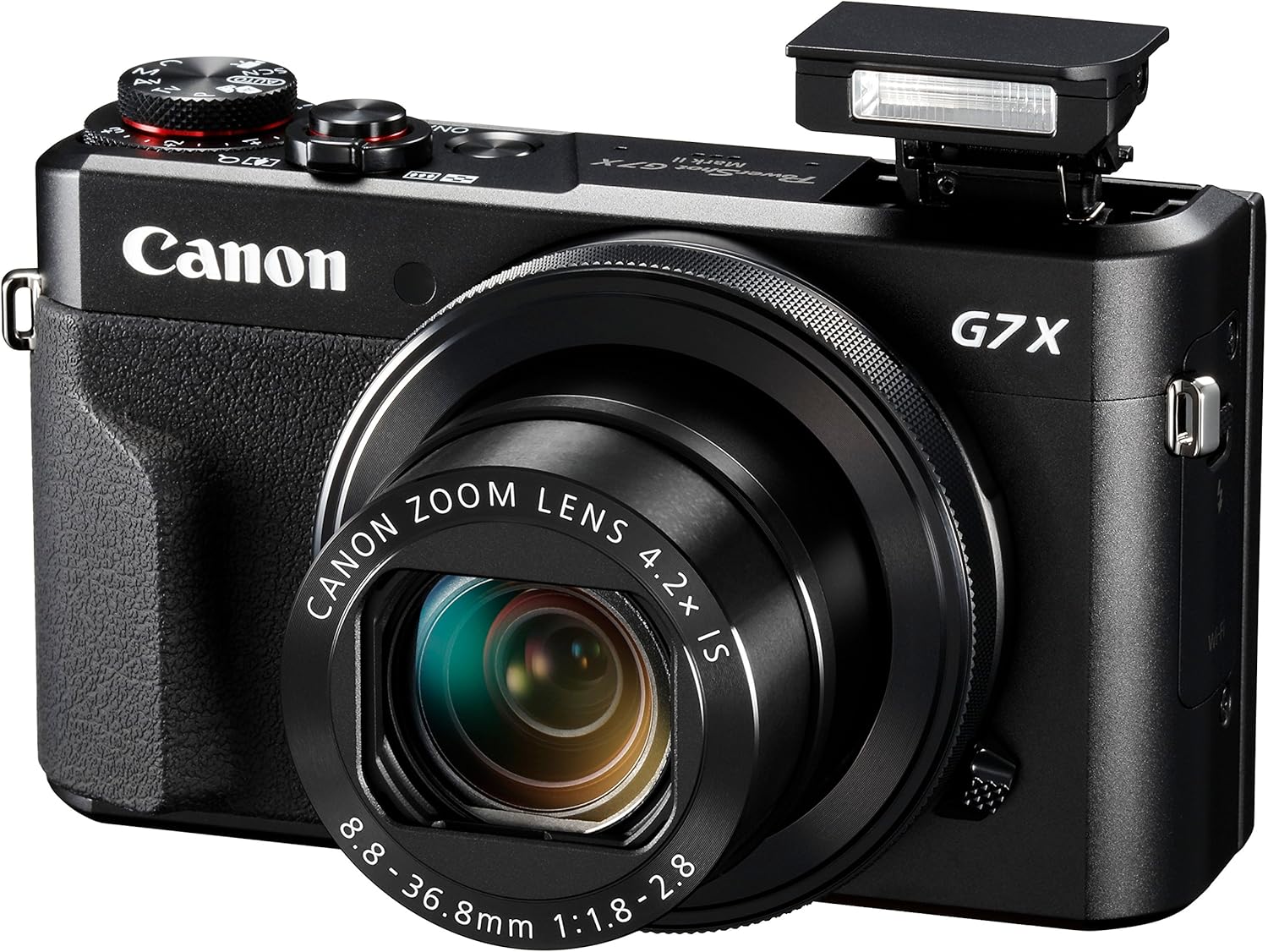
    Canon PowerShot G7 X Mark II

    Known for its portable and compact size, the Canon Powershot G7 X Mark II easily became one of the best point & shoot cameras for vloggers, especially to those who travel vlogs. This vlogging camera comes with a large 20.1 MP image sensor and provides you full HD 1080p video recording at 60 fps rate as well. It also has a large flip screen to take better selfie videos.

    The quality of video this camera takes can be compared to a bulky DSLR, which makes it good for vlogging. It takes high-quality videos, has a touchscreen flip screen, and accurate autofocus system. Another good thing about this camera is that it has superb performance in low light in comparison with other compact cameras. Finally, one of the most important things, why the G7 X is well-loved, is its optical image stabilization. When you want to record while walking, which is common in vlogging, the Canon G7 X Mark II gives you a smooth video. And despite having no microphone input, it records decent audio. 

    From sharp colors and image detail to manual controls, fast aperture, large zoom, low-light performance, and built-in flash, the Canon Powershot G7 X Mark II is put on the professional level and photographers and vloggers alike just love it.

    best vlogging equipment - Canon G7 X Mark II
    Canon PowerShot G7 X Mark II


    Features:

    • A camera with a bright lens, sensor and DIGIC 7 to capture quality photos, movies. FL – 4.2 x zoom: 8.8 (W) – 36.8 (T) mm, 35 mm film equivalent: 24 (W) – 100 (T) mm
    • Shoot and share stunning full HD 60 p movies with creative control, Touch AF for cinematic focus pulls and 5-axis Dynamic IS
    • Easily connect to your smart device, shoot remotely, then share or back up your creations using Wi-Fi with NFC and Image sync
    • Enjoy simple creative control with a lens control ring, intuitive touchscreen operation, 14-bit raw and picture styles
    • 3 Inch type touchscreen and tilt-type LCD monitor 180 degrees upwards, 45 downwards
    • Powershot G7 X mark II battery pack NB-13L battery charger CB-2LHEAC wrist strap NS-DC12 AC cable

    Sony Alpha a6400 

    The Sony Alpha a6400 is a great vlogging camera especially when you want your shots to be highly cinematic and larger than life videos. It is compact and handy, making it the perfect device for videomakers who don’t want to lug around their bulky DSLRs all the time.

    The a6400 camera comes with a 24MP interchangeable lens and an APS-C sensor. It has real-time autofocus and can record videos in Full HD and 4K@30fps. The image quality is solid, sharp, and vivid.

    Sony Alpha a6400 Mirrorless Camera

    Features:

    • Next-Gen speed: experience the world’s fastest 0. 02 sec AF with real-time AF and object tracking
    • Enhanced subject capture: wide 425 Phase/ 425 contrast-detection points over 84 percent of the sensor
    • Fast & accurate: up to 11Fps continuous shooting at 24.2 MP raw with crisp, clear natural colors
    • Multiple movie functions: make time-lapse movies or slow/quick motion videos without post-processing
    • Tiltable LCD screen: customizable for vlogging, still photography or recording a professional film
    • In the box: rechargeable battery (NP FW50) AC adaptor (ac uud12), shoulder strap, body cap, accessory shoe cap, eyepiece cup, micro USB cable. Metering Type:1200 zone evaluative metering

    Canon EOS M50

    The main reason why this model is one of the most loved cameras in the vlogging atmosphere is that excels in virtually all fields of performance while presenting zero pitfalls and drawbacks aside from costing a bit more in comparison to an average budget camera. 

    The Canon EOS M50 is one of the best affordable cameras that can capture incredible details. It has an excellent photo and video quality that will allow you to capture high-resolution 4k videos. It has ultra-fast and accurate autofocus, image stabilization, and has a flip-out touchscreen LCD. With this gadget in your hand, you can be sure that your videos are sharp and eye-catchingly vibrant.

    In comparison with other cameras, the Canon EOS M50 can be named as one of the best vlogging equipment for vloggers, considering its price and quality. Moreover, this camera is easy to use and handle which is perfect for beginners.

    Canon EOS M50 Mirrorless Vlogging Camera

    Features:

    • Dual Pixel CMOS AF for fast, accurate autofocus that helps you get the photo you want right as the moment happens
    • 241 Megapixel APS C CMOS sensor and the DIGIC 8 Image Processor delivers incredible color, clear details, and stunning range
    • Vari angle Touchscreen LCD has a flexible tilt range ideal for high angle and low angle shooting and reviewing your photos
    • Built-in high-resolution electronic viewfinder features approximately 2,360,000 dots to see high amounts of detail when capturing
    • Use the EOS Utility Webcam Beta Software (Mac and Windows) to turn your compatible Canon camera into a high-quality webcam


    Best Vlogging Microphones

    Your vlog will need to have high-quality audio to keep your viewers happy and engaged, otherwise, your videos will look extremely unprofessional. Here are our best mic picks.

    Blue Snowball iCE Condenser

    If you are on the lookout for a vlogging microphone for home-type vlogs that is quick and easy to use, the Blue Snowball iCe is what you need. This mic records crystal clear audio, so you can use it for recording full bands, acoustic instruments, gaming, or vocals. It is compatible with any PC or Mac and doesn’t require any drivers to be installed.

    This product has been certified by Skype so its promises are genuine. You can record sound for your vlogs and podcasts in the comfort of your home!

    Blue Snowball iCE USB Mic

    Features:

    • Custom condenser capsule offers crystal clear audio for Skype, Messages, and FaceTime
    • Record vocals, create podcasts and add narration to your home movies
    • Add crystal clear audio to recordings for YouTube. Frequency Response: 40 –18 kHz
    • Easy plug and play directly to your Mac or PC-no drivers to install
    • Snowball iCE is a USB 2.0 device (USB 3.0 compatible as per USB 3.0 backward compatibility specification).Sample/word Rate: 44.1 kHz/16 bit

    Rode VideoMic Pro+ Compact

    The Rode VMPR VideoMic Pro is a shotgun microphone that has a superior audio quality for outdoor vlogs. It has an omnidirectional pickup pattern that helps capture sound from all directions without any distortion and background noise. With that being said, this incredible microphone comes with a shock mount which reduces the distortion noise whenever you move your camera at a high pace. Although this equipment is bulky and more expensive compared to other microphone types, its durability and sturdy audio quality make it the best mic for outdoor vlogging in the market.

    Rode VideoMic Pro+ Compact

    Features:

    • Still, with the best-in-class Rycote Lyre suspension system onboard, the VideoMic Pro+ improves on the existing VideoMic Pro capsule/line tube and windshield, plus boasts a host of new features.
    • Automatic power function (with plug-in power availability) is perfect for the run-and-gun shooter, automatically turning the microphone off when unplugged from the camera.
    • The built-in battery door makes replacing the battery a breeze – plus it won’t get lost.
    • Power options the VideoMic Pro+ can be powered by the all-new and included Rode LB-1 lithium-ion rechargeable battery, 2 x AA batteries, or continuously via micro USB.
    • Digital switching – will ensure the user has the ultimate capture of the audio signal at the source, reducing post-production and editing times.

    Rode smartLav + Lavalier Microphone

    If you are looking for the best budget-friendly portable microphone, this Rode smartLav + Lavalier Microphone is it. Being a professional-grade wearable microphone, this equipment is a must-have for every vlogger’s starter kit!

    This microphone has a high-quality omnidirectional condenser capsule that picks up sound from every direction equally. To reduce wind noise and vocal distortion, there is a foam popup shield in the mic. There is also a durable clip and built-in cable management to easily attach it to your shirt. 

    This mic’s higher signal-to-noise and improved sensitivity make it perfect for vlogging. The cable is also tested for strain and is long-lasting. This clip-on mic can be used with both Android and iPhone and works well with most recording apps.

    Rode SmartLav+ Omnidirectional Lavalier Microphone

    Features:

    • Ensure you buy genuine Rode products. Products from sellers which say ‘fulfilled by amazon’ under the price are not authorized resellers, and may not be selling genuine products.
    • Buy only from Amazon.com (labeled ‘shipped and sold by Amazon.com’)
    • Broadcast quality, professional-grade Lavalier Mic with TRRS Jack
    • High-quality omnidirectional condenser capsule; discrete 4.5-millimeter miniature microphone
    • Kevlar reinforced cable ensures that you never stretch or snap your microphone under normal usage conditions


    Best Lightning for Vlogging

    If your vlogs are mostly indoors, lighting is necessary. Famous vloggers, like Zoella and PewDiePie, emphasize the importance of lighting because they don’t want to annoy their audience with a poorly-lit video. Here are our top vlog lighting equipment picks.

    Diva Ring Light Super

    This Diva Ring Light is considered a required vlogging equipment for daily vlogging. Whether you’re a photographer or a videographer, a good lighting kit is crucial. Without a lighting arrangement, your videos will not be complete.

    The Diva Ring Light Super Nova has 5400k fluorescent light that will give your face a fresh look. It comes with a 6’ stand and Z bracket for easy mounting of ring light on a tripod. It has a flexible gooseneck so the mounting of lights and setup is made easy. If you want to adjust the brightness of the lights, there is also a knob included in the setup.

    This ring light is a favorite of every YouTuber as it excels in providing soft lights and true-to-life color radiance. Its cost is worth every penny when your videos turn out great after shooting.

    Diva Ring Light Super Nova

    Features:

    • 500W ring light with 5500K (Daylight) bulb included
    • Dimmable feature allows for softer light options (dims to 20% of full power)
    • Includes mounting bracket for cameras on tripods, as well as gooseneck for flexible mounting on light stands
    • Comes with easy-to-install diffusion cloth
    • Accepts 110V – 240V power for worldwide use (US plug)

    MOUNTDOG Lighting Kit

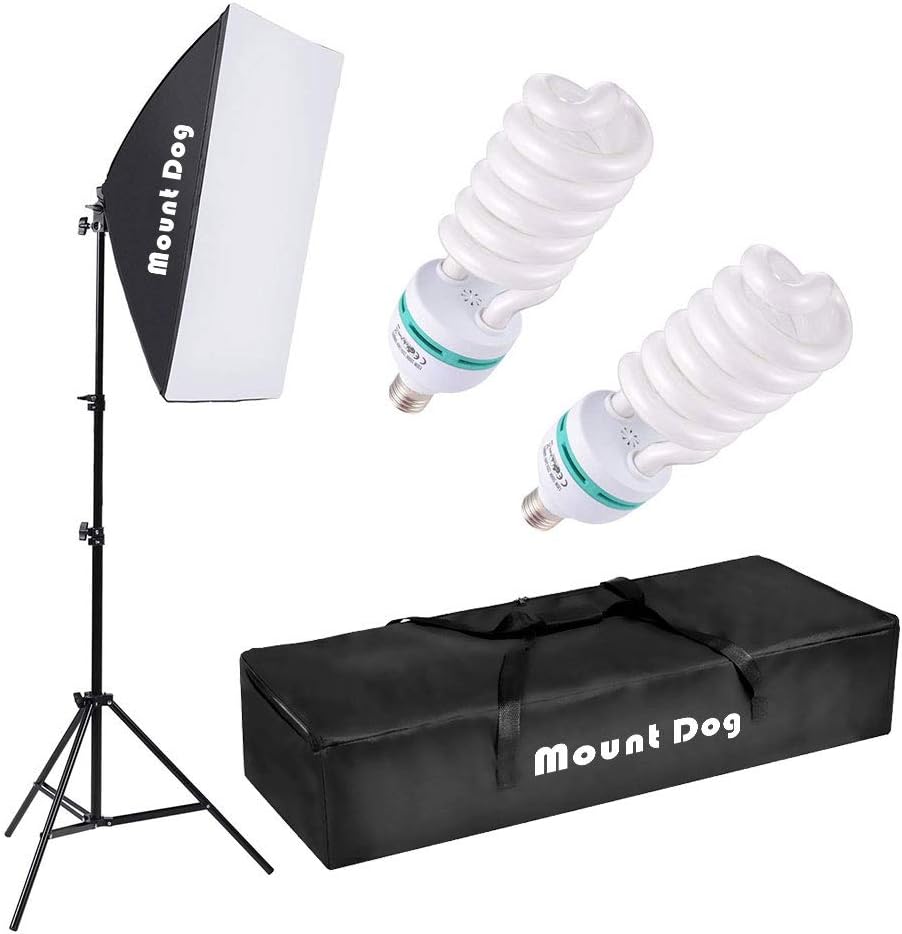
    For pro YouTubers, this Mountdog Lighting kit is the best. It’s an affordable kit that solves the dim lighting issues in your room. This kit has two 13W light bulbs that will brighten up a place, no matter how dark it is. There is also an adjustable lamp holder and a softbox to equally spread the light in all directions. With this kit, you will never have to worry about low-lighting issues when filming a vlog indoor.

    Softbox Lighting Kit by MOUNTDOG

    Neewer Camera Photo Video Lighting Kit

    This lighting kit is budget-friendly and perfect for new vloggers. This kit has a special LED SMD Design that makes it a dimmable ring light. It is portable, lightweight, and has a service life of more than 50000 hours.

    The Neewer Camera Photo Video Lighting Kit is compatible with most Android and iOs smartphones, although a smartphone loader is required to connect it to any phone. For connecting to the camera, you will need a hot shoe adapter.

    This is a comprehensive kit complete with all the necessary accessories and tools. You wouldn’t have to buy any other additional equipment to use this lighting system. Easy peasy and very affordable.

    Neewer Ring Light Kit

    Features:

    • 1. The light stand is packed in a separate box INSIDE the big package box (under the ring light box at the extreme bottom of the box)as shown in the 2nd picture. If you can’t find it, please contact seller customer service; 2. Instructions for unfolding the stand are in the 8th picture. The legs are upwards, so please unfold the legs upside down
    • Kit includes: (1)18″/48cm Outer 55W 5500K LED Ring Light+(1)61″/155cm Light Stand+(1)Soft Tube+(1)White and Orange Color Filter Set+(1)Ball Head Hot Shoe Adapter+(1)Universal Power Adapter with Plug+(1)Smart Phone Holder+(1)Carrying Bag for Ring Light
    • Dimmable 18″/48cm Outer 55W 5500K 240 Pieces LED bulbs with a wide dimming range from 1%-100%. Special LED SMD design, lightweight and portable
    • 61″/155cm light stand is constructed from aluminum alloy, giving it exceptional strength; The soft tube makes the light rotate freely for the best position. White and orange color filters are made of high light transmission plastic material with steady color temperature
    • A hot-shoe adapter is compatible with most DSLR cameras and a smartphone holder for most smartphones (iPhone 8 Plus/8/X/7/6, Samsung Galaxy S9/S8, Huawei, etc. ).


    Best Vlogging Tripods

    Most newbie vloggers will have an issue with an unstable camera. This can be easily solved by having a tripod. Here are the best tripods in our opinion.

    Joby Gorillapod

    With its unique octopus-like legs, the Hoby Gorillapid has attracted the attention of many vloggers. This tripod has been named the best because aside from having a great build, it also comes in an extremely affordable price tag. Famous vloggers like Casey Neistat is using this tripod. This comes with better compatibility options for different types of cameras and it is easy to use. The flexible and wrappable legs allow you to attach this tripod to any place you want so you can capture the best frames.

    JOBY GorillaPod

    Features:

    • Flexible: Grip it, wrap it, stand it, wrappable legs allow you to secure professional camera equipment to virtually any surface
    • Efficient: Arca-Swiss system compatible quick release plate stays connected to the camera for instant set-up
    • Accurate: Numbered scale on the base lets you accurately repeat 360 Degree pans, secondary knob locks pan separately

    Manfrotto MTPIXI-B PIXI Mini

    This is the latest mini tripod that can double as handheld grip support for DSLR and table tripod. The Manfrotto MTPIXI-B PIXI Mini provides portable support for various devices such as phones, mirrorless cameras, and DSLRs. It is designed to excel at its functions by having a rapid push-button lock for the head adjustment. The Manfrotto mini tripod has set a new standard for mini tripods with it being smart, active, and beautifully-built.

    This tripod is one of the most budget-friendly portable tripods and is a perfect choice for photographers and vloggers alike. With a stainless steel and tactile finish, the Manfrotto MTPIXI-B PIXI Mini is one of the best tripods for vlogging in the market.

    Manfrotto PIXI Mini Tripod

    Features:

    • Mini tripod for Compact System Cameras
    • Comfortable handgrip to capture great videos
    • Push-button locking mechanism for easy setup
    • Lightweight, intuitive to use and easy to carry
    • Attractive Italian design

    Manfrotto 055 

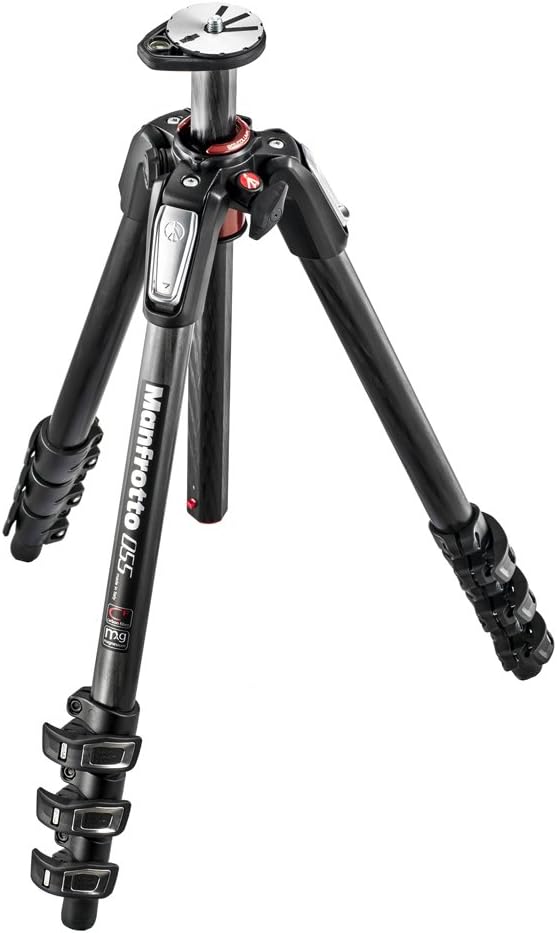
    The Manfrotto 055 is a vlogging tripod with amazing specs and an expensive price tag. But despite it being costly, it’s the best tripod for professional vloggers for a couple of reasons.

    The Manfrotto 055 is ideal for DSLRs and mirrorless cameras. It has adjustable legs and rubber grips for better traction. This tripod comes with durable construction sd the carbon fiber body is resistant to shocks and accidents. If you prefer shooting wide-angle frames, this tripod makes it easy. If you are thinking of a long-term investment, this baby is definitely worth the buck.

    Manfrotto MT055CXPRO4 055 Carbon Fiber 4-Section Tripod

    Features:

    • Premium Carbon Fiber Legs Offer Unprecedented Strength and Rigidity
    • Manfrotto’s Q90 Center Column Boasts Quick One Finger Operation
    • Easy Link Connection for Adding Accessories
    • Note: Please note this product is imported from the USA, please use the appropriate adapter when plugging in the products.

    It’s important to maintain a professional look through all of your videos. If you are a startup vlogger, the pieces of equipment above are worth considering to aid in your vlogging venture. Widen your horizon and do some research. There are all kinds of equipment made for everyone that’s within their budget.

    The digital world is all about vlogging right now, so if you are jumping in the bandwagon, don’t forget to arm yourself with the right stuff!

  • Taking the 5 Best Time to Slow Down this Holiday Season

    Taking the 5 Best Time to Slow Down this Holiday Season


    Taking the Time to Slow Down this Holiday Season

    Saying that 2020 has been a difficult year is an understatement. But although 2020 has been one of the toughest years because of the global pandemic, there have been silver linings along the way. Let’s not forget to be thankful for all the things we still have, despite all the bad things that have happened. Christmas is only 2 days away now, and so this is a reminder that taking the time to slow down this holiday season is a valid thing to do. 

    You have been in a loop of nonstop working and being productive. It’s time to pause and take a breather. Enjoy the season, embody the Christmas spirit, and celebrate the holidays with your loved ones.

    Here are some things you can do to enjoy the holidays.

    Movie Night

    Cuddling up and watching a festive film is a great way to spend time with your loved ones. Put on your coziest pajamas, make a cup of hot chocolate or a bowl of popcorn, and immerse yourself in the film. Classics like How the Grinch Stole Christmas, Elf, A Christmas Carol, Miracle on 34th Street, and Home Alone are great picks!

    Bake Cupcakes and Cookies

    Spend time with your family in the kitchen and bake your favorite treats!

    Taking the 5 Best Time to Slow Down this Holiday Season

    Listen to Christmas Tunes

    Christmas time is always a great time to go caroling, but with the pandemic still going on, it isn’t recommended to go out and expose yourself. Do you miss singing your favorite Christmas Carols? Play them on speaker and sing along to your favorites. I always find singing along to these merry tunes the best way to feel the holiday spirit.

    Make your own Holiday Cards

    It’s always fun to create something. And this holiday season, it doesn’t matter if you are artistically inclined or not. Pull out your arts and crafts supplies and make your own holiday card collection! Fill them in with warm and loving messages to all of your loved ones and friends. This simple and personal thing will always draw out a smile as you give them to someone you cherish.

    Be Tech-Free – for just a day!

    One way to delve into your childhood days is to unplug and just enjoy the day tech-free. Technology helps us connect to our loved ones who are far away from us, but sometimes, it can make us lose touch with the people who are right in front of us. Unplugging for even just a day will help you slow down and savor your personal time. Be present and enjoy the time you spend with your family and loved ones. Play board games, read a book, bake, or cook. 

    Do you have Christmas traditions with your family? What activity do you look forward to doing the most this holiday? Hopefully, this list will give you ideas on how to enjoy and slow down this holiday season.

    Merry Christmas!

    Last-minute Christmas shopping? Here are 12 Gift Ideas for Small Business Owners.


  • 7 Simple Ways to Deal With Stress at Work

    7 Simple Ways to Deal With Stress at Work

    7 Simple Ways to Deal With Stress at Work

    Pressure and stress at work are common; every working individual has, at some point in their lives, experienced this. All jobs can be stressful, even if it’s something that you like to do. Work stress can be short-term, as the pressure by an incoming deadline or of having to overcome a challenging obligation. But when work stress becomes chronic, it can be overwhelming and can have a long-term effect on both physical and mental health. According to surveys, work is cited as one of the most significant sources of stress. While it’s hard (and next to impossible) to avoid tension and stress at work, there are steps you can take to manage and cope with stress at work.

    Sources of Stress from Work

    Several factors may give you stress at work, here are some:

    • Excessive Workloads
    • Low Salary
    • Lack of social support
    • Work isn’t challenging
    • Few opportunities for career growth and advancement
    • Conflicting demands
    • Unclear work performance expectations
    • Interpersonal Conflicts
    • Physical Discomfort

    stress at work

    Ways to Manage and Deal Stress at Work

    Start your day right and on a positive note

    While this may not be the easy fix, you’d be surprised at how your day will turn out great by starting it on a positive note. Do you always rush your mornings preparing for work and even before arriving in the office, you’re already stressed? Having a stressful morning will highly affect how you’ll react to stress in your workplace. When you start your day right by having a healthy breakfast, good planning, and a positive attitude, you’ll find that workplace stress will be easier to handle.

    Track your triggers and stressors

    Maybe keeping a journal will be helpful for you. Write down your thoughts and identify which situations create the most stress for you and try to notice the pattern in how you respond to them. Records your thoughts and feelings. Write about how your days went by and how you reacted to certain stressful situations. By knowing your responses to these things, you’ll be able to assess how to do better the next time.

    Develop healthy responses

    Instead of fighting stress with food or alcohol, do your best to do healthier choices. Exercising is a great stress-reliever. Yoga is also a great alternative to release tension. Make time to do your hobbies and your favorite pastimes. Whether it’s watching a film, reading a book, having a picnic with family, or going out with friends, make sure to make time to do the things that make you happy. Getting enough hours of sleep will also help in coping with stress. Build healthy sleeping habits by minimizing stimulating activities at night such as phone and television use.

    Establish Boundaries

    Know that you can choose not to engage in work activities after working hours. In our world today, we often get the pressure of having to be available 24/7. This will just give you unnecessary stress. Establish boundaries and stick with them. Make it a rule that you are not going to check your emails when you get home or answer any phone calls during dinner. People have different preferences on how they want to blend in their work and home life, it’s up to you to create clear boundaries to take care of your health and avoid stress.

    Avoid conflicts

    Interpersonal conflicts at work can take a toll on your emotional health. Conflict among co-workers always happens, so it’s best to stay away from conflict if you can help it. Don’t engage in work gossip and don’t share too many of your personal opinions about politics and religion. Avoid being involved with people who do not work well with others and make sure you know how to handle conflicts when you find yourself in one.

    Avoid multitasking

    Multitasking is great and was once seen as a fantastic way to maximize time by getting more done. But then, people have eventually realized that doing two things at the same time affects their speed and accuracy. The focus shifts between the two things making the work on both things half-assed. Instead of multitasking, try to concentrate on one job at a time to stay on top of your tasks.

    Learn how to relax

    There are a couple of ways you can do to relax. Practices such as meditation, mindfulness, and deep breathing can work wonders on a stressed mind. Start your journey by taking a few minutes each day to simply focus on what you are doing, like eating, breathing, or enjoying your food.

  • How to Leverage Social Media for your ECommerce Business in 2021

    How to Leverage Social Media for your ECommerce Business in 2021

    Leverage Social Media

    It’s no question that social media has a large impact on marketing and advertising your business. Since its advent, having profiles on chosen social media platforms are considered a must if you want to reach a wider and more diverse audience. Perhaps it’s because one of the best advantages of using social media marketing is its cost-effectiveness compared to other forms of traditional marketing.

    According to statistics, 54% of internet users use social media to research product reviews and recommendations. And this is why having a notable online presence is essential on several social media platforms.

    There are still many businesses that haven’t embraced the advantages of the digital age, and those businesses are seriously missing out on the opportunities they can get from having a strong presence in the Leverage Social Media scene.


    How to Leverage Social Media for your ECommerce Business

    Every day, more people are creating accounts and getting into social media. As an ECommerce business owner, driving traffic to your website is one of your main goals to attract new customers. This is where you can make good use of social media. As this is not something new anymore, you have a bigger competition out there so the question is, how do you stay on top of the game?

    Here are ways you can leverage social media for your ECommerce business.


    How to Leverage Social Media for your ECommerce Business in 2021

    Interact and connect with customers

    Most consumers that have used your products or experienced your services won’t always write and share their opinions about it. But that doesn’t mean that they didn’t have a good experience with you. It’s just that for some customers, it’s not a priority to reach out to businesses to let them know what they think about your product. That’s why you have to be the one to make the first move to thank them for their purchase and to ask them for their feedback.

    Emailing your customers for their feedback is a great idea. You can include clickable links of your socials so that all they have to do is browse on them and click follow if they want to. Who knows, aside from leaving their comments, maybe they’ll also share your social media pages with their friends and family.

    You can also encourage your customers to upload a photo of their purchase and tag you on their social accounts. This can be a really great way to reach more audiences.

    Learn About Your Personas

    With an eCommerce business, knowing who your audience is always the goal. Using social media, you will get to learn more about your target markets and your buyer personas. Each platform has a different demographic user base so you’ll get to gain insights from every group and how to market your products or services to them.

    Think about this: 25% of TikTok’s users are aged 10-19, 32.1% of Instagram users are between 25-34, and about 77% of US adults who use Facebook are between 30-49 years old. If you are a clothing brand, you’ll gravitate towards Leverage Social Media using Instagram more to market your products to these millennials. If your target market is older adults, you’ll gravitate to using Facebook to advertise your business Leverage Social Media.

    With the use of social media, you’ll gain valuable insights that will help you create a solid marketing strategy to better your digital marketing campaigns.


    Let your customers get to know you

    Your social media platforms are the best place to show off your brand’s story and personality. It is where you can directly speak to your audience and let them get to know you better. When users know a brand, trust will grow, and you’ll be able to turn them into loyal customers with a little more push.

    Social media is all about visual content and this is a great and easy way to tell stories. Marketing isn’t just about showcasing your products and services all the time. It’s also about creating an impact, a lifestyle that will inspire and empower your viewers. Use social media to share wonderful stories that will reflect your brand mission and values.

    Provide Customer Support

    Customers tend to flock more to brands that they believe have an outstanding rapport on customer service. The use of social media allows companies to provide this in various ways. With Twitter, you can respond to customer complaints. With Facebook Messenger, you can address them by chatting directly with your customers. Leverage Social Media 

    Moreover, you can respond to any customer questions using your social media accounts. You can also share helpful tips and solutions for any issues. Customers appreciate transparency and social media is a great platform to disseminate public information.


    Optimize Social Media Posts Leverage Social Media 

    The trends in social media are ever-evolving and you will always have to keep up with them if you want to stay relevant. Share posts that will fit in the platform you’re using, this will help your brand attract relevant users that will actually appreciate your offers and content.

    Take advantage of the features provided on each platform and stay up-to-date with the platform’s updates so you don’t miss out on any opportunities to reach out to more audiences.

    Don’t forget to include relevant keywords in your descriptions when you post images and videos. Also, make use of hashtags, those are very useful. Leverage Social Media 


    Social media is a huge part of businesses, particularly when you are in the eCommerce section. It’s one of the best ways to spread brand awareness, generate leads, nurture followers, and generate sales. Utilize the tips stated above to leverage social media for your eCommerce business to achieve your goals – whether that’s driving traffic, earning awareness, or even converting sales.

    Visit our blog for more articles like this.